Showing posts with label v3. Show all posts

2/12/09

The Return of Featured Lists

Numbah posted an interesting review the other day regarding v3 list discovery that we talked about for a while here at the RateItAll Global HQ Compound and Campus:
Its hard to break out into new topics at times, like you're stuck...
And then Twansalem chimed in as follows:
So I'm not the only one who feels like V3 is telling me what to rate? Magellan had previously referred to the feed as the river, and it sure feels like a river to me. Easy to navigate if you want to go where it's taking you, but hard to buck the current if you don't. In the previous version, it seemed a lot easier to just go rate something else. But a couple of days ago when it seemed like all anyone was talking about was either gay marriage or the economic stimulus package, I got bored and just took a couple days off from RIA. I don't think I would have done that with the older version.
We've also heard chatter from other site heavyweights that the Featured Lists (and also the Hottest Lists and New Stuff pages) were missed in V3 as jump off points.

Well, Featured Lists are now back. You can see them on your home page, in the sidebar.

Please keep the feedback coming. We're listening.

1/29/09

Improvements to Item and Topic Pages

We are quietly plugging away on implementing some of the things we had on V2 that didn't make it into the V3 launch.

We've tightened up the list pages, including adding back the precise numerical rating for each item on the list:


We've added "Next List, Next Item" links at the bottom of every list and item, which makes it easier to browse horizontally through the site:


We've added a neat "Also Listed In" feature to the sidebar on every item page that pulls up other places in the site where the same item appears. Here's an example for "Madonna":


Stay tuned for more tweaks and improvements - little by little we are getting there.

1/23/09

Your Posts now Showing in Your Feed

By popular demand, we now include your site activity in the "My Feed" view. This should prevent folks from having to toggle back and forth to different views to see their own stuff.

And as one reviewer put it, it's much easier to see how your reviews are doing in terms of votes with this format.

1/21/09

How New Items Are Approved on RateItAll

We handle new item suggestions in V3 a little bit differently than we did previously.

In V3, any new item suggestion - whether you add it to somebody's list, to a RateItAll list, or using our new "rate anything" feature - the new item is immediately created. You can rate the item, you can share the url of the item with your friends, and you will immediately see the new item / review show up in your "my feed" view. No approval required for this part.

However, there still is an approval process - either by the list owner, or by RateItAll admins. An approved item will show up in search, on the list, and in the My Feed and Everyone's Feed views. As with the previous site, if the list owner does not respond to a new item suggestion within a few days, we will step in and approve the item.

1/14/09

Today's Updates

We rolled in a bunch of fixes / updates today:

- The editing profile / account bug is fixed.  You should now have no problem embedding videos and things
- We expanded the length of the feed.  We doubled the number of stories in the default feeds from 10 to 20, and each time you click more, you get another block of 20.  This should reduce the clicking required to see content.
- We enabled video and safe html embeds like YouTube videos into reviews and item descriptions.  We're still working providing editing buttons for things like bold, link, and italics for your reviews.
- We fixed a number of one off bugs
- We tightened up quiz results, stripping out results from folks who have only rated a couple of things within a test.  We also changed the definition of a "match" for the purposes of calculating a compatibility score.  Before today, a 4 was considered a match with a 3, 4, or 5.  We've now put in exact matching for the compatibility calculation.  Because of this, you will no longer see pages of 100% matches, but the results will be more meaningful.

I think those are the big things.

If you bear with us, you'll notice a gradual tightening of the site as we listen to your feedback and squash known bugs.

Thanks for your patience!

Today's Lesson: Configuring Your Feed / Home Page

Hi all, there's a lot of new functionality on the site, and I want to start giving some pointers as to how stuff works.

Today I'd like to cover the Home Page / News Feed view for logged in members.
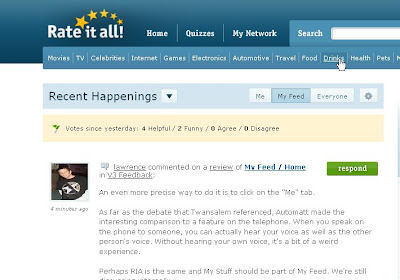


There are three tabs and two buttons on this page.

The tabs are: Me, My Feed, and Everyone.

The "Me" tab displays your most recent activity on the site.

The "My Feed" is your custom, personalized view of recent activity on the site - more on this to follow. At its simplest level, this view is a combination of the activity of the people that you are following, and the topics that you are interested in.

The "Everyone" feed is the full firehose of ALL recent site activity. You can think of this view like the old Recent Reviews page, but supplemented with other activity like new lists, new items, quizzes taken, and even ratings posted.

So how do you control these feeds?

There are two ways (and these are the two buttons).

The downward arrow is a Temporary Filter on whatever view you are looking at. It's an easy way to isolate certain story types - just lists, just ratings, just reviews, just quizzes, etc. When you click away from the home page, your Temporary Filter settings will be forgotten, and your view will go back to your Permanent Settings.


So how do you control your permanent settings?

It's the Gear Icon. This is where the magic happens, and where you can personalize your permanent feed views to your tastes.


Let's walk through the Gear Icon settings one by one.

Keyword

The first tab on your settings is a Keyword Tool, that lets you subscribe to keywords that you're interested in. For example, if I type in "Mexico," "San Francisco," and "NBA," the site will do its best to include every review from RateItAll related to those keywords in your "My Feed" view.

Using the keyword tool, you can also indicate stuff that you DON'T want to see in your "My Feed" view. For example, if you were sick of reviews about Dingos, you could add the word "Dingo" to your block list, and the site will do its best to filter out reviews related to dingos from your "My Feed" view.


Community

The second tab in your settings is the "Community" tab. On this tab you can specify whose activity shows up in your "My Feed" view. Do you want to see only activity from your friends (people you follow)? Or do you want to push it out a few degrees to show activity from friends of friends, or even, friends of friends of friends. The "friends of friends of friends" setting will give you the broadest view of site activity.

We've also built in a helpful, albeit devious tool for filtering out reviews from particular reviewers here, even if they are your "friends" on the site. For example, if I got sick and tired of activity from "Lawrence," I could add filter out their activity. This feature is perfect for when you feel the pressure to follow someone, but don't actually like reading their stuff.

Like the Keywords tab, the Community tab only affects your "My Feed" view.


Saved Topics

The third tab in your Gear Icon settings is the "Saved Topics" tab. As you browse the site, you may have noticed "Fave" buttons on various pages - items, lists, categories, etc. Clicking Fave on any content page of the side will subscribe you to all the activity from that page.

For example, one of my favorite lists on the site is Mexican Beer. Clicking the "fave icon" on this page will subscribe me to new reviews posted to this list. It's a great way to track the reviews coming in to lists that you made, or to track reviews of a specific item like your blog, or yourself! (if you are on the reviewers list)

Like the Keywords and Community tabs, the Saved Topics tab only affects your "My Feed" view.


Story Types

The final tab is the "Story Types" tab. This is the setting that determines what types of things are included in your Feed views. Do you want to see only reviews like the old recent comments page? You can make that happen. Do you want to see Reviews, Comments, Quizzes, but not Ratings without reviews? Likewise, this is easy to do.

Unlike the other tabs, this setting affects all three tabs (me, my feed, everyone) on your home page.

This is a permanent setting, and the system will remember your choices as long as you are logged in, and until you decide to change them again.


I hope this helps. There are powerful tools in here, and I believe that folks now have the tools to create exactly the experience that they want on RIA.

Thanks for all of the feedback - it's been very helpful, and we're acting on a number of the suggestions already - please keep it coming (feedback@rateitall.com).

1/13/09

V3

As most of you already know, V3 is live. We "soft launched" quietly yesterday with the goal of doing some bug fixing before our public launch today.

We will be doing a number of posts in the coming days about some cool, expert only type features that are on the new site. We'll also be doing our best to explain how basic things work with V3, as well as working hard to eliminate any outstanding bugs - thanks to all who have sent feedback to us (feedback@rateitall.com) regarding bugs, missing features, and the like.

Here are my three favorite new features on the new site:

1) The news feed. The code name for this feature internally was "the river," and I think that's pretty descriptive. This is the home page for logged in folks. You can poke your head into this page and watch all the activity from your friends flow on by. In one sense, the Recent Reviews page on the old site has become the primary metaphor for V3. We have category level rivers for things like Sports, and Subject level rivers for things like Baseball. For the advanced users, you can customize your news feed settings by clicking on the Gear icon on your home page. You can follow keywords for things you're interested in (e.g. beer, art, music, movies, etc.), and you can set your network settings to include friends, friends of friends, or even friends of friends of friends. You can even do things like hide all activity from "My Feed" of particular users (ever have somebody that you need to be their "friend," but don't actually like reading their reviews?) And finally, you can hide keywords like "politics" or "religion" if the droning starts to get your down. I find this feature extremely powerful. I see it as the power to build the exact RateItAll experience that you want.

2) Compatibility Quizzes. These are a fun, quick way to rate a bunch of things and compare yourself to others around RIA. We have hundreds of these quizzes, across many different categories. We will be working on tightening up the quiz results display (so we don't show folks who have only rated one item within a quiz), as well as making the results more precise. We will also be adding paging to the bottom of the quiz pages, and adding in quiz specific search to help with the discovery of new quizzes. This is a fun feature that's only going to get better.

3) "Write a Review" Feature. The internal code name for this feature is "global add." It literally lets you write a review of anything. There's a wizard that walks you through the process of adding new items to the site, and we try to always provide a catch-all topic for your item if you can't find the exact right place to put it. For me, this changes site experience dramatically. I can now rate any damn thing that I please, whether or not a list exists for it. A dish at a restaurant. A taqueria in Mexico City. My friend's blog. You can add anything and everything, and the item will immediately be available for rating and sharing (though it will need to be approved to show up in site search and the list). Try this feature out if you haven't already - it's powerful.

(Forgive me a quick sentimental moment, but I'm really proud of the RateItAll team. These guys really went all out on this - for the last few weeks, the office was full seven days a week, and often until midnight. We're all a bit exhausted (my wife said to me this morning, but feeling pretty good about where things are at.)

That's all for now. As I said, there will be lots more to follow on how this thing works.

12/31/08

Want to be in rotation on RIA's home page?

Hi, we're finalizing our V3 home page and will have a number of our top member's pics in rotation.

But here's the catch:

It needs to be a headshot, and you need to be a Top 500 RIA reviewer by helpful votes.

Big group photos and photos that are not you won't work for what we have in mind.

So if you want your mug in rotation on our home page, please change your profile picture to a headshot (of you), and shoot me a note.

It probably needs to be in the next 30 minutes or so.

12/16/08

V3: Messaging 2.0

RateItAll currently has a messaging system that allows you to send and receive messages to and from other RateItAll members.

It's pretty lousy.

It uses pop-ups.

You can't track your sent messages.

The formatting is pretty tough on the eyes.

It tells you that you have new messages even when you've already read them.

Well, V3 is going to address these issues, and will finally give us a proper messaging system. Here are a couple of screenshots.

Here's a peek at the v3 message center:


And here's a look at a v3 message exchange:


I'm hopeful that along with some big new things, V3 will bring incremental improvement to a lot of basic things about the site.

12/15/08

V3: Your Activity is Your Profile

One of the subtle differences in V3 over the existing site is in how we treat profiles. On the current site, if you click on somebody's user name you get taken to a profile page that shows links to a user's activity, and stuff like "favorite music," "favorite books," etc.


The problem that I have with this page is that it's stagnant. Folks fill in their profiles once, and then forget about them. It makes for boring reading (with the exception of some of the embed stuff that folks have done to give their profile pages some flavor).

V3 is going to take a slightly different approach. When you click on a user's name, you will get taken directly to that user's activity stream. By using the filters, you'll be able to isolate that member's most recent activity in things like ratings, reviews, quizzes, comments, lists, etc.


In other words, you are what your activity says you are.

Of course, everyone's old profile format will still be available with things like embedded videos, testimonials, and the like - it's easy to toggle between a member's activity stream and their profile.

12/9/08

We've Gone Stats Crazy - Part Three

In the third, and likely final, installment of our "we've gone stats crazy" series, I'm going to show you a third way that V3 is stats heavier than V2.

We will be giving logged in users daily updates of accumulations of helpful / funny / agree / disagree votes.

Check it out.


As mentioned in earlier posts, there will also be other ways to see how you rank against the day's top performers.

We've Gone Stats Crazy - Part Two

Along with the local leaderboards covered in the previous post, V3 will bring with it a significantly beefed up Hall of Fame page that will allow you to track top users in various time periods (day, week, month, year, forever) in the following categories:

Helpful Votes
Funny Votes
Disagree Votes
Agree Votes
Most Followers
Most Reviews
Most Total Contributions

We will also display exactly where the logged in user ranks in each category for each time period in relation to each of the respective leaders.

For those of us who are a bit competitive about this stuff, this should be a big step up. Here's a screenshot (it's running off incomplete data, so don't take these rankings as gospel):


(btw, I'm tagging all v3 related posts with the clever tag "v3" for easy access)

12/8/08

We've Gone Stats Crazy - Part One

One of the things I'm really looking forward to in V3 is the ability to track top reviewers in hundreds of different categories.

Currently, we have one Hall of Fame, which tracks cumulative helpful votes across all categories.

What we are doing with V3 - in addition to maintaining a beefed up Hall of Fame (more on this to follow) - is tracking top reviewers (by number of helpful votes), in hundreds of different categories and sub-categories, by different time periods like day, week, month, and forever.

For example, with V3, you will be able to tell who the top rated Sports reviewer is, or on a more granular level, who the top rated boxing reviewer is (my bet is professional boxing writer Randyman). You'll also be able to see who the top rated Politics reviewer is (guesses?), or action figure reviewer, or music reviewer, or reggae reviewer, or travel reviewer, or pets reviewer - get the picture?

For example, here is a screenshot of the Beer sub-category page of V3. You'll note that this sub category page has it's own "river" of recent reviews (like the recent reviews page, but just for beer), as well as a module in the sidebar that shows who are the top rated reviewers of Beer by day, week, month, and forever.

While I don't expect this particular category to be very competitive - word has it Magellan plans on running away with this one - perhaps there will be other categories where others will shine. I mean, we're all experts in something, right?

12/5/08

Flagging Reviews in V3

A feature that people have been asking for forever, that we're finally going to be adding is the ability to flag reviews that violate the site rules. When V3 launches, it will be easy for RIA members to bring inappropriate reviews to our administrators' attention. Here's a pic:

11/28/08

Demo

OK folks, I'm going to start letting a few of you onto our new demo site.

Here are a couple of things to keep in mind:

None of the data (reviews, comments, profiles, etc.) that you post on the demo site will be saved, or linked to your regular rateitall account. This is only for testing purposes.

You will not be able to login to your real RIA account on the demo site. Please create a new test user.

Also, there is still some important functionality missing. Specifically, "quizzes" and some aspects of "sharing" are not yet live. Some of the pages still need to be optimized for speed as well.

Here are some things I suggest checking out:

Try posting a review from both the item page and the list page.

Try commenting on a review

Try making a list

Try configuring your home page by clicking on the gear icon.

Check out Community < style="font-weight: bold;">

11/24/08

Need Your Help

For the past couple of months we've been working very hard on a new version of RIA (code name: v3) that incorporates many of the best things about the current site, a number of your suggestions, as well as a number of new things.

Over the next few days, I'm going to be reaching out to some of you to hammer on a demo version of "V3." It will be running on a test database, so anything you post will not be saved.

Here are a couple of things you can count on for V3:

- A return to RIA's original blue / green color scheme
- An emphasis on the format of the Recent Reviews page throughout the site
- The addition of a "disagree" button
- The addition of our compatibility tests / quizzes to RateItAll.com (many of you have tried these on Facebook or MySpace)
- Significantly improved publishing and sharing experiences
- More in depth hall of fame / member stats tools
- Significantly easier ways to add things to the site

And lots more.

Stay tuned - if you'd like to be included on this early sneak peek, please message me on the site. If I know who you are, I will give you access.


- Lawrence

Apture