
4/30/08
Plaxo Integration
Any RIA'ers use Plaxo to manage their contacts? Well, they've built out this neat social network called Plaxo Pulse that aggregates all of your web activity into a single news feed for your Plaxo contacts. As of today, RateItAll is now integrated, so you can add your RateItAll Review stream to your newsfeed just by filling in your RateItAll nickname. Here's a screenshot of my feed:


4/28/08
Rating Art
RIA Member Planetary Gear has created some of my all time favorite weblists.
Check out his lists for Dali and Picasso - he's added pictures of each painting. Want an enjoyable and peaceful hour or so? Try speedrating either the Dali or Picasso list and watch the art go by...
Check out his lists for Dali and Picasso - he's added pictures of each painting. Want an enjoyable and peaceful hour or so? Try speedrating either the Dali or Picasso list and watch the art go by...
4/27/08
MS-XXXXXXXX, FB-XXXXXXXX, and RateItAll.com
There's been a bit of confusion recently about what's up with all the RateItAll accounts beginning with "MS" or "FB" that occasionally show up on the Hottest Reviewers section of the home page.
This is related to the feature that we recently launched for MySpace and Facebook that allow folks to read and write reviews from their MySpace account, as well as to take compatibility tests.
The short version is that users with an "MS" user name are folks who have not explicitly joined RateItAll.com, but are using the site's functionality via MySpace. Similiarly, folks with an "FB" user name are people that have not explicitly joined RateItAll.com, but are using our functionality via Facebook.
If somebody who is not logged into RateItAll.com adds our feature on Facebook or MySpace, we automatically create a RateItAll account for them starting with "FB" or "MS." Existing RateItAll members should make sure to merge their RateItAll / MySpace or RateItAll / Facebook accounts in order to avoid having two different accounts - to do this, just click the "Merge" tab on the Facebook or MySpace feature.
Recently, a RateItAll reviewer accidentally set up an MS account in addition to his / her RIA account, without merging it with their RateItAll account. This resulted in two different, active accounts on RateItAll. By itself, this is not a TOS violation.
However, some way or another, the RateItAll reviewer's "MS" account then applied more than a thousand "helpful" votes to that same member's RateItAll account. The only way this could have been done was via manual clicking of the helpful button on each review. It probably took a long time.
And because we have IP tracking, we know that the vote giver and vote receiver were operating off of the same Internet connection - in this case, the RateItAll reviewer's home.
This is where we run into trouble. While accidentally creating duplicate accounts via MySpace or Facebook is totally understandable, using this dual account status to pad your account with helpful votes is not.
As a rule, I don't like to make disciplinary discussions public. But in this particular case, the reviewer involved made some pretty outlandish claims that their account had been "hacked" as part of a conspiracy against them, and that the 1,000+ helpful votes that had been padded onto their account were a result of a glitch in the system.
There is no glitch in the system. The only way to access somebody else's MS account is to know their MySpace.com login. The only way to give another user helpful votes is to manually click the helpful buttons associated with their reviews. And our IP tracking tools leave no doubt as to the fact that the votes were given and received from the same location.
So what's the lesson here? Well, the first one is Please Don't Cheat. Our tools will catch you, and it might be embarrassing. The second one is that if you are using our MySpace and Facebook features, it's probably a good idea to merge accounts so that you are not diluting your reviews over two different accounts.
I hope that helps.
This is related to the feature that we recently launched for MySpace and Facebook that allow folks to read and write reviews from their MySpace account, as well as to take compatibility tests.
The short version is that users with an "MS" user name are folks who have not explicitly joined RateItAll.com, but are using the site's functionality via MySpace. Similiarly, folks with an "FB" user name are people that have not explicitly joined RateItAll.com, but are using our functionality via Facebook.
If somebody who is not logged into RateItAll.com adds our feature on Facebook or MySpace, we automatically create a RateItAll account for them starting with "FB" or "MS." Existing RateItAll members should make sure to merge their RateItAll / MySpace or RateItAll / Facebook accounts in order to avoid having two different accounts - to do this, just click the "Merge" tab on the Facebook or MySpace feature.
Recently, a RateItAll reviewer accidentally set up an MS account in addition to his / her RIA account, without merging it with their RateItAll account. This resulted in two different, active accounts on RateItAll. By itself, this is not a TOS violation.
However, some way or another, the RateItAll reviewer's "MS" account then applied more than a thousand "helpful" votes to that same member's RateItAll account. The only way this could have been done was via manual clicking of the helpful button on each review. It probably took a long time.
And because we have IP tracking, we know that the vote giver and vote receiver were operating off of the same Internet connection - in this case, the RateItAll reviewer's home.
This is where we run into trouble. While accidentally creating duplicate accounts via MySpace or Facebook is totally understandable, using this dual account status to pad your account with helpful votes is not.
As a rule, I don't like to make disciplinary discussions public. But in this particular case, the reviewer involved made some pretty outlandish claims that their account had been "hacked" as part of a conspiracy against them, and that the 1,000+ helpful votes that had been padded onto their account were a result of a glitch in the system.
There is no glitch in the system. The only way to access somebody else's MS account is to know their MySpace.com login. The only way to give another user helpful votes is to manually click the helpful buttons associated with their reviews. And our IP tracking tools leave no doubt as to the fact that the votes were given and received from the same location.
So what's the lesson here? Well, the first one is Please Don't Cheat. Our tools will catch you, and it might be embarrassing. The second one is that if you are using our MySpace and Facebook features, it's probably a good idea to merge accounts so that you are not diluting your reviews over two different accounts.
I hope that helps.
4/16/08
Compatibility Detail: Coolness
Guys, we've just launched a Compatibility Detail feature for Facebook that lets you drill down into your compatibility score with someone and see exactly where you are and aren't compatible.
Here's a screenshot of my compatibility detail on the alcohol compatibility test with Genghis. It is suddenly clear that he likes martinis, while I do not.

Here's a screenshot of my compatibility detail on the alcohol compatibility test with Genghis. It is suddenly clear that he likes martinis, while I do not.

4/11/08
4/9/08
4/8/08
Bible Compatibility Test Now Live...
.... on Facebook and MySpace. Many thanks to lmorovan for his help and guidance on this test.
4/3/08
Two Quick Housekeeping Updates
1) There's now an easier way to merge your MySpace / Facebook accounts with your RateItAll account. We've added a "Join/Login" tab to the main navigation of both apps - just click that link in the app header and then fill in your RIA login information if you haven't already merged your accounts.
2) We've started backing up the database every four hours.... this should reduce the risk of lost data should we have any more db growing pains.
2) We've started backing up the database every four hours.... this should reduce the risk of lost data should we have any more db growing pains.
4/2/08
Actor Compatibility Now Live...
.... on Facebook and MySpace. We're going to try and roll one test in per day.
4/1/08
RateItAll Panel for your MySpace Home Page
Guys, for those of us who use the RateItAll Compatibility App on MySpace, we just added a cool new tool.
It's a panel for your MySpace "Home" page (not your profile page) that displays new compatibility tests as they come on line. Here's a screenshot:
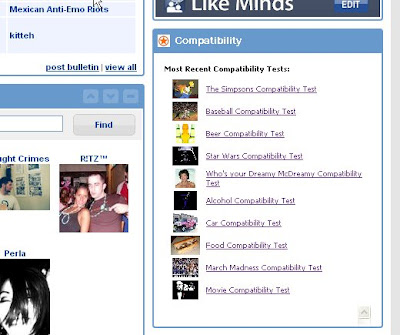
In order to make this panel show up on your page, here is what you do:
1) Open the Compatibility App
2) In the upper right hand side, click on "View My Apps"
3) Click on the "Settings" link next to the Compatibility App icon
4) Check the box that says "Show on your Homepage" and click "Update"
That's it. This will be a neat way to stay on top of new tests that are getting published. I wish that Facebook had something similar.
It's a panel for your MySpace "Home" page (not your profile page) that displays new compatibility tests as they come on line. Here's a screenshot:

In order to make this panel show up on your page, here is what you do:
1) Open the Compatibility App
2) In the upper right hand side, click on "View My Apps"
3) Click on the "Settings" link next to the Compatibility App icon
4) Check the box that says "Show on your Homepage" and click "Update"
That's it. This will be a neat way to stay on top of new tests that are getting published. I wish that Facebook had something similar.
Simpsons Compatibility Test
I just pushed a Simpsons Compatibility test live onto Facebook and MySpace.
If you have a Weblist that you think would make a good compatibility test, let me know.... but here's the catch - every item will need to have a picture and description.
If you have a Weblist that you think would make a good compatibility test, let me know.... but here's the catch - every item will need to have a picture and description.
3/31/08
General Compatibility Test
Guys, I made some tweaks to the general compatibility test on MySpace and Facebook. There was feedback that some of the items were too obscure for a general test, so I replaced several items with more mainstream things.
So, if you login to the app on Facebook or MySpace, please take a few minutes to complete the remaining items of the general compatibility test.
So, if you login to the app on Facebook or MySpace, please take a few minutes to complete the remaining items of the general compatibility test.
3/26/08
This is cool
Trebon is my friend on Facebook and on MySpace. We both took the Star Wars Compatibility Test.
Now when I open the RateItAll App on either Facebook or MySpace, I see my compatibility score with Trebon... it's like RateItAll + MySpace + Facebook is all one site.
Now when I open the RateItAll App on either Facebook or MySpace, I see my compatibility score with Trebon... it's like RateItAll + MySpace + Facebook is all one site.
Star Wars Compatibility Test Live
The Star Wars Compatibility Test is now live on Facebook and MySpace. Many thanks to Numbah for his advice and counsel in this area.
3/24/08
MySpace Testers - I'm Ready for You
Thanks to everyone who expressed an interest in testing RateItAll for MySpace - it appears that a lot of RIA'ers also have MySpace accounts.
So here's what I would like you to do:
Step 1
Login to your MySpace account and go the RateItAll for MySpace page (we call this feature "Compatibility").
Step 2
Add the app ("app" stands for "application" / feature) by clicking the big button.
Step 3
* Before doing anything, merge your RateItAll account with your RateItAll for MySpace account*
You can do this by clicking the "My Reviews" tab, then clicking the "Join RateItAll and share ad revenue...." link in the right hand column.
Then scroll down and fill out your RateItAll login information in the "merge accounts" section and hit "Merge."
(make sure NOT to join RateItAll again by filling in the info at the top, only fill in the "merge" section)
Step 4
Have at it. Try a compatibility test. Try the search engine. Try reading and writing reviews.
Anything you post on MySpace will show up on RateItAll under your regular account (and on the recent reviews page), and you can accumulate helpful / funny / agree votes on MySpace from friends who have the Compatibility App that go to your RateItAll totals.
Once your MySpace friends add the Compatibility app, you'll be able to see their reviews (and award helpful votes), via the "Friends' Reviews" tab.
Stuff that does not yet work
Currently, none of the invite tools work (MySpace hasn't turned this feature on yet). So if you finish a compatibility test and check the boxes next to the names of your friends that you want to invite, they WILL NOT receive your invitations. The only one to invite them currently is to manually send them a message with the link.
We also don't yet have a Profile Module to display your reviews and compatibility tests - that should be coming in the next few days.
Please give it a whirl and let me know what you think....
So here's what I would like you to do:
Step 1
Login to your MySpace account and go the RateItAll for MySpace page (we call this feature "Compatibility").
Step 2
Add the app ("app" stands for "application" / feature) by clicking the big button.
Step 3
* Before doing anything, merge your RateItAll account with your RateItAll for MySpace account*
You can do this by clicking the "My Reviews" tab, then clicking the "Join RateItAll and share ad revenue...." link in the right hand column.
Then scroll down and fill out your RateItAll login information in the "merge accounts" section and hit "Merge."
(make sure NOT to join RateItAll again by filling in the info at the top, only fill in the "merge" section)
Step 4
Have at it. Try a compatibility test. Try the search engine. Try reading and writing reviews.
Anything you post on MySpace will show up on RateItAll under your regular account (and on the recent reviews page), and you can accumulate helpful / funny / agree votes on MySpace from friends who have the Compatibility App that go to your RateItAll totals.
Once your MySpace friends add the Compatibility app, you'll be able to see their reviews (and award helpful votes), via the "Friends' Reviews" tab.
Stuff that does not yet work
Currently, none of the invite tools work (MySpace hasn't turned this feature on yet). So if you finish a compatibility test and check the boxes next to the names of your friends that you want to invite, they WILL NOT receive your invitations. The only one to invite them currently is to manually send them a message with the link.
We also don't yet have a Profile Module to display your reviews and compatibility tests - that should be coming in the next few days.
Please give it a whirl and let me know what you think....
Scheduled Maintenance Tonight: 1:30AM EST
Guys, we're dropping some more memory into our new database server late tonight. This shouldn't take more than 30 minutes. Really.
Subscribe to:
Posts (Atom)


 Posts
Posts

