Yes, RateItAll has a Twitter account. We have used it pretty sparingly so far, and typically only tweet a few times a day with lists that catch our eye. Here are some of the lists that we tweeted this week:
Best Mass Transit System
Best California Ski Resort
Best Guitarist of All Time
Worst US State Flag?
The Women of Tiger Woods
We also retweeted some of Jedi58's awesome travel reviews of Cairo, Venice, and Naples.
So if you're just getting going on Twitter, please follow us - we'll be interesting, we promise.
Showing posts with label twitter. Show all posts
12/11/09
6/1/09
Are you on Twitter? Follow RIA's accounts
by
lawrence
at
Monday, June 01, 2009
Here are some fun Twitter accounts to follow for RIA addicts:
/AllReviews - this account gives you a real time feed (with links) of everything getting rated on the RIA network

/AllComments - this account gives you a real time feed of all new comments

/AllItems - This account gives you a real time feed of all new items added to RIA (minus LongTail)

/AllQuiz - real time feed of all quizzes taken

/RateItAll - Editorially selected pages from RateItAll
/AllReviews - this account gives you a real time feed (with links) of everything getting rated on the RIA network

/AllComments - this account gives you a real time feed of all new comments

/AllItems - This account gives you a real time feed of all new items added to RIA (minus LongTail)

/AllQuiz - real time feed of all quizzes taken

/RateItAll - Editorially selected pages from RateItAll
5/27/09
Perfect Review Sharing
by
lawrence
at
Wednesday, May 27, 2009
We've spent the last few weeks working very hard on improving the sharing functionality associated with various parts of RateItAll - specifically, Lists, Items, and Reviews.
We've focused our efforts on three ways to share in particular:
- Email
- Facebook
- Twitter
If you look at the top of the right hand column of any List, Item, or Review page, you will now see a "Share This Page" module:

First, let's look at the email sharing option.
Let's say I wanted to share my awesome list of Mexican Beer (which I am very proud of) with my friends via email.
Clicking the envelope icon on my Mexican Beer page pops open the following form:
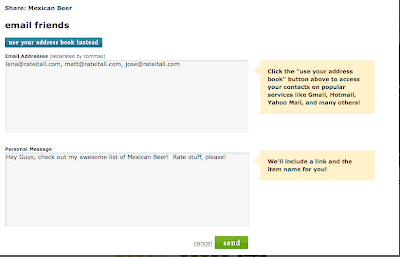
With this form, I am able to type in email addresses one by one, and include a brief note.
I can also pull in contacts from my address books on services like Yahoo! Mail and Gmail by clicking the "Use Your Address Book Instead" button:
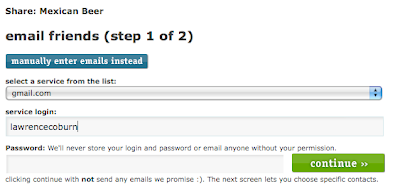
This tool lets you select friends from your address book to receive an email with a link pointing to your list (or item, or review).
Now let's look at Facebook. By now, just about everyone has a Facebook account, and Facebook's newsfeed format is a perfect way to share your lists, reviews, or items with your Facebook friends.
Clicking the Facebook Icon (farthest one on the right), will do one of two things depending on if you are logged into Facebook at that moment:

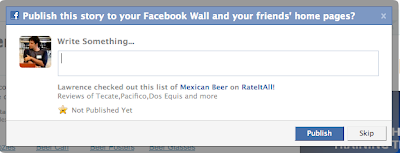
If you are logged into Facebook, you will see a prompt from Facebook that looks like this:
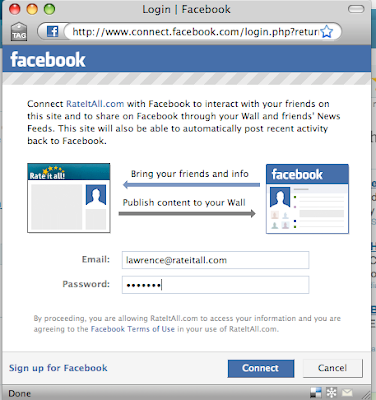
If you are not logged into Facebook, you will be prompted to login to your Facebook account before seeing the posting prompt above:
When you share a RateItAll story on Facebook, your Facebook profile will look like this:
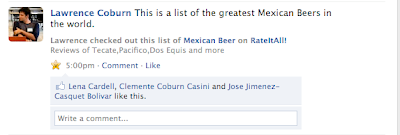
And when my Facebook friends share RateItAll stories, this is what I see on my Facebook home page:
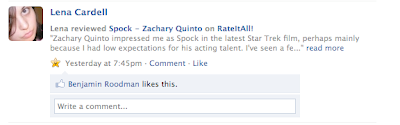
Now let's talk about Twitter. I know that folks on RIA are a bit skeptical, but this service is taking off like a rocket right now.
Clicking on the light blue "T" icon:

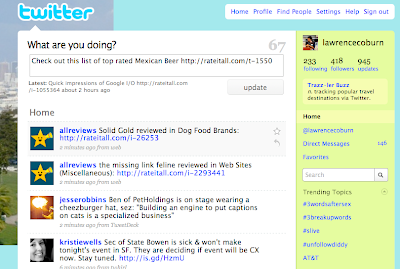
Will automatically open up a new browser window that includes a link to the page (list, item, or review), as well as some text that indicates whether it's a list, item, or review that you are sharing. Here is what it looks like - note that the posting field is pre-populated with the link and text, all you have to do is click "update":
One thing to note - you can share any list, item, or review page to Facebook, Twitter, or Email, whether or not you created the page, and whether or not you are even logged in to RateItAll.
These sharing features are available to everyone, and we hope they will be a great way to get more exposure for your reviews and lists.
Please poke around and let us know what you think.
We've focused our efforts on three ways to share in particular:
If you look at the top of the right hand column of any List, Item, or Review page, you will now see a "Share This Page" module:

First, let's look at the email sharing option.
Let's say I wanted to share my awesome list of Mexican Beer (which I am very proud of) with my friends via email.
Clicking the envelope icon on my Mexican Beer page pops open the following form:

With this form, I am able to type in email addresses one by one, and include a brief note.
I can also pull in contacts from my address books on services like Yahoo! Mail and Gmail by clicking the "Use Your Address Book Instead" button:

This tool lets you select friends from your address book to receive an email with a link pointing to your list (or item, or review).
Now let's look at Facebook. By now, just about everyone has a Facebook account, and Facebook's newsfeed format is a perfect way to share your lists, reviews, or items with your Facebook friends.
Clicking the Facebook Icon (farthest one on the right), will do one of two things depending on if you are logged into Facebook at that moment:

If you are logged into Facebook, you will see a prompt from Facebook that looks like this:

If you are not logged into Facebook, you will be prompted to login to your Facebook account before seeing the posting prompt above:

When you share a RateItAll story on Facebook, your Facebook profile will look like this:

And when my Facebook friends share RateItAll stories, this is what I see on my Facebook home page:

Now let's talk about Twitter. I know that folks on RIA are a bit skeptical, but this service is taking off like a rocket right now.
Clicking on the light blue "T" icon:

Will automatically open up a new browser window that includes a link to the page (list, item, or review), as well as some text that indicates whether it's a list, item, or review that you are sharing. Here is what it looks like - note that the posting field is pre-populated with the link and text, all you have to do is click "update":

One thing to note - you can share any list, item, or review page to Facebook, Twitter, or Email, whether or not you created the page, and whether or not you are even logged in to RateItAll.
These sharing features are available to everyone, and we hope they will be a great way to get more exposure for your reviews and lists.
Please poke around and let us know what you think.
5/26/09
We just pushed a couple of improvements live
by
lawrence
at
Tuesday, May 26, 2009
We just made a couple of enhancements to the site:
- We added perfect sharing tools on every List, Item, and Review page. You can now push out any of these pages with one click to Facebook, Twitter, or Email, whether you are logged in or not. This will be a full post shortly.
- The home page river now remembers what view you were on if you click away, so that if you click back, you don't have to reconfigure your view. For example, let's say you are on your home river / feed page, and have used the filters to isolate just comments. If you click away from your home page, and then click "back" on your browser, you will see the same view that you left - just the comments. The only view state we are not remembering yet is the paging - this will be added soon. Sounds minor, but this is a big improvement.
- We have created a short form URL of all of our item and topic pages that can be more easily shared. Here's an example of the long form URL:
http://www.rateitall.com/i-839549-should-never-be-used.aspx
And here's the short one:
http://rateitall.com/i-839549
- We have fixed some annoying formatting issues when publishing reviews to Facebook - things like apostrophes and quotations should work fine now.
- We added perfect sharing tools on every List, Item, and Review page. You can now push out any of these pages with one click to Facebook, Twitter, or Email, whether you are logged in or not. This will be a full post shortly.
- The home page river now remembers what view you were on if you click away, so that if you click back, you don't have to reconfigure your view. For example, let's say you are on your home river / feed page, and have used the filters to isolate just comments. If you click away from your home page, and then click "back" on your browser, you will see the same view that you left - just the comments. The only view state we are not remembering yet is the paging - this will be added soon. Sounds minor, but this is a big improvement.
- We have created a short form URL of all of our item and topic pages that can be more easily shared. Here's an example of the long form URL:
http://www.rateitall.com/i-839549-should-never-be-used.aspx
And here's the short one:
http://rateitall.com/i-839549
- We have fixed some annoying formatting issues when publishing reviews to Facebook - things like apostrophes and quotations should work fine now.
Subscribe to:
Posts (Atom)